
Crypto Wallet Security Checklist 2025: Protect Crypto with Ledger

| KEY TAKEAWAYS: |
| — 2025 has been the worst year on record for crypto losses, mainly due to scams such as malware and phishing — As threats evolve, so too does security, aiming to protect against sophisticated attacks leveraging AI and other attack vectors. — With the Ledger Ecosystem and following security best practices, you can avoid the majority of these scams and mitigate the worst risks. |
Crypto hackers are more dangerous and determined than ever before. Scammers, con artists, and thieves are committing record levels of crime, and their biggest targets aren’t exchanges or protocols, but individual users just like you.
According to security auditing firm Hacken, $3.1 billion in crypto was lost in the first six months of the year. This makes 2025 the worst for crypto crime on record. In July blockchain research firm Chainalysis reported similar independent research which demonstrated this growing crime wave, stating that crime in the first half of 2025 was already ‘more devastating than the entirety of 2024.’
Cybersecurity firm CertiK also raised the alarm in May when it pointed out a growing number of these attacks were focused on individual users rather than companies, adding that the “majority of losses have come from wallet compromises and phishing.”
For all these reasons 2025 marks a year when crypto users should be especially cautious, but with this crypto wallet security checklist 2025, Ledger Academy will dive into the critical steps you can take to safeguard yourself against the very worst criminals in crypto.
Understanding the 2025 Crypto Threat Landscape
The precursor of any mitigation strategy is an awareness the threat exists. So, let’s explore some of the biggest threats your assets face:.
Malware Targeting Wallet Interfaces
Malware is essentially a piece of software with a malicious purpose, and it’s one of the key threats your assets face. Specifically to crypto, malware often targets wallet interfaces, posing as legitimate software, trying to convince you to download it on your computer or phone by accident.
To make matters worse, ready-made malware can be purchased as a ready-made service on dark web forums. Often described as Malware-as-a-Service, these programs allow criminals with almost no technical ability to target victims with cutting-edge methods. Some popular (and formidable) examples of these types of infostealers include RedLine, Vidar, Lumma, Stealc (), and many more.
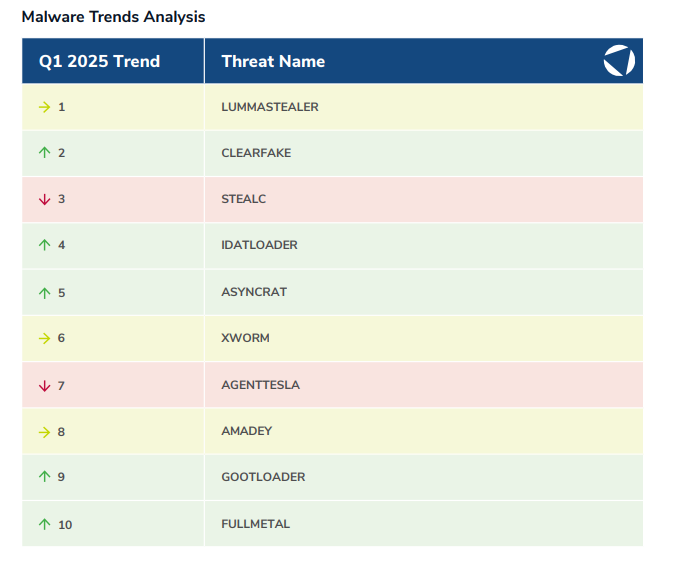
Once an infostealer is installed on a system it trawls through your files, including your photo albums, to find saved passwords, credit card data, and autofill information, aggressively seeking out private keys for crypto wallets, or seed phrases.
Since these malware use sophisticated obfuscation technology they often go undetected by virus checkers. Unfortunately, it’s common that the first time a user knows something is wrong is when they log in to their wallet and find it empty.
While the actor vector remains the same for all malware, there are a few different ways they can attempt to breach your system:
Bad Browser Add-Ons
A common way malware infiltrates users’ systems is by posing as a browser add-on. To illustrate, in July, security researchers discovered more than 40 fake browser add-ons in Mozilla Firefox’s browser extension site. These fake extensions mimicked popular wallets and exchanges including MetaMask, Phantom, TrustWallet, OKX, and Coinbase.
The scammers went to great lengths to make the wallets appear convincing, imitating both the branding and descriptions of genuine wallets, and by leaving thousands of 4 and 5 star reviews. But once installed, the browser add-on harvest private keys and login credentials allowing hackers to drain user accounts.
Infected Software
Another way for hackers to infiltrate user machines with malware is via infecting seemingly single-use software For example, you could download what you think is simply a pdf reader or file converter—and it may serve that purpose perfectly well. However, under the hood, the seemingly harmless app will also contain malicious code, granting it much more power than you think. Once on a machine the malicious software begins to steal information (like login credentials or private keys) or change crucial functions in legitimate apps, aiming to take control of your crypto wallets.
For instance, in March the FBI issued a warning about file converters after security firm ReversingLabs issued a report on a specific file converter which promised to convert word files into .pdf documents for Adobe Reader. Instead, it inserted malicious code into legitimate Atomic and Exodus wallets, hijacking transactions and swapping out intended recipients addresses for the hackers’.
Convincing users to run malicious programs or functions
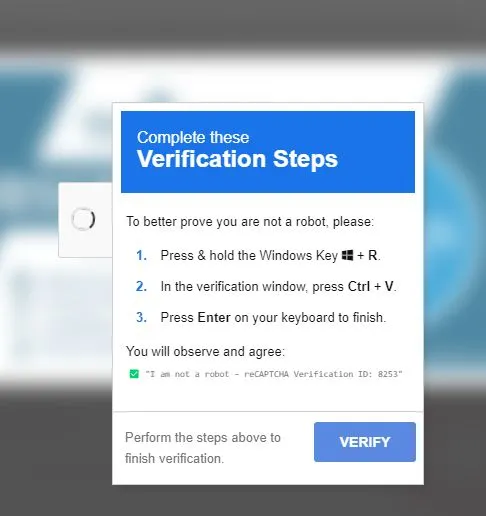
Another way hackers may attempt to gain access to your private keys or login credentials is through convincing you to run code in your command line to manually edit the code running on your computer. Typically they will use social engineering tactics to make you believe that running this code is necessary to verify your access to an app, service or website.
A recent example of this scam was uncovered by anti-virus firm Malwarebytes in 2025. Posing as reCaptcha, Google’s trusted Captcha service, the hackers prompted users to run a piece of malicious code in their command line which would return a notice saying “I’m not a robot.” Once the user followed this process, the damage was done. The malware was downloaded and running on the user’s computer, giving the bad actor all the access they needed.
How to avoid malware scams
While malware scams can be sophisticated, there’s a very simple way to avoid them all, and that’s storing your private keys in an environment isolated from the internet. That’s exactly the reason hardware wallets—such as Ledger signers—exist.
To clarify, malware scams are impossible to avoid while using a software (hot) wallet, since they store your private keys locally on your computer, making them vulnerable to malware. By keeping your private keys isolated from an internet connection, ensuring that physical confirmation on the device is
Phishing
Phishing is a type of social-engineering attack where a scammer poses as a legitimate organization (such as a bank or crypto exchange) to persuade the victim to part with sensitive personal details.
Email Phishing
Email phishing usually follows the same process. They will obtain your email address from a dark web database or through data you’ve shared with a legitimate company that sells it on. Next, the scammers will send you an email, typically claiming your crypto account is compromised, or you need to take an action to update your account on the site. There’s where the attack lies: they prompt you to click on a link or scan a QR code and send you to the phishing site designed to look exactly like the official platform. From there, they either ask you to fill in your login credentials or the seed phrase to your crypto wallet—and game over! Your accounts are now compromised.
False support teams
Another common phishing method uses social media accounts posing as legitimate support teams. Often, they’ll align their personal brands with a trusted crypto company, and sometimes even directly impersonate real employees. Next, they target the company’s users via their official social media accounts, offering help to users experiencing problems. Unfortunately they also target people who have already been scammed, offering to help them “recover their accounts”. Instead, the scammer will ask for sensitive information such as login credentials or seed phrases, or alternatively, may ask the victim to share their screen and lure them into revealing this information inadvertently.
Fake airdrop announcements
Another key phishing method is using fake airdrop announcements posing as a legitimate chain or token. While they can use many different ways to hook their victims, the most common method is via sponsored adverts on Google and social media. By paying for their adverts, they appear in your feed or search results, using identical branding to the chain or token they are impersonating, and using the promise of free money to lure their victims in. However, connecting your wallet to their platform to “sign up to the airdrop” will typically initiate a malicious transaction, either draining all of a specific token or allowing them unbridled access to your entire account.
Deepfake Phishing
The rise of AI deepfake technology is behind a new wave of phishing scams more sophisticated than anything seen before. Advances in AI give them new attack vectors that make phishing much more sophisticated. Put simply, these types of phishing scams aim to clone a person’s voice and to impersonate them in real-time. This is called a deepfake, and it’s used to imitate trusted industry leaders with a greater rate of success.

According to a report from cybersecurity firm Right-Hand, deepfake voice phishing rose by 1,633% in Q1 of 2025 against the previous quarter. And it’s not just that these scammers are attempting new attacks without results: they are succeeding!
For example, in 2024, a deepfake video call convinced an employee of the British design and engineering firm Arup to send $25 million to scammers. The scammers had used AI technology to clone the identity of the company’s Chief Financial Officer, and they managed to clone it accurately enough that the employee followed through
How to avoid Phishing Attacks
To avoid the same fate, there are a few key ways you can stay vigilant and mitigate phishing attacks:
- Don’t trust, verify: Make sure you check any accounts contacting you are official. Typically a legitimate company will specify the email addresses or social accounts they will contact you from on their official website. On that note, it’s important to check the URL of the site you’re visiting too. An official website won’t have extra characters or symbols and will directly link to their official social media accounts.
- Don’t fall for urgency: if an email, phone call or social media account tells you to take action urgently, this is a red flag. Typically there will be a grace period that allows you to take action if you need to, letting you verify the need to take action at all.
- Don’t click links blindly: just because you’ve received an email or seen an advert that claims to be legitimate, doesn’t mean it is. Clicking links or scanning QR codes can lead you to untrustworthy sites or platforms that leave you vulnerable.
- Don’t enter your credentials without verifying you’re on the official platform or website, and never enter credentials after following a link in your email or from a personal social media account.
- Never give anyone your seed phrase or enter it into an online platform: there’s no reason anyone needs your seed phrase. With self-custody, your seed phrase is yours and yours alone!
The greatest weapon hackers have is playing on your fears and emotions. If something doesn’t feel right, then it probably isn’t.
Smart Contract Risks
Beyond malware and phishing, another risk to your crypto lies in interacting with smart contracts.
To explain, a smart contract you sign may do nothing more than approve a single transaction or it could ask for more control over your wallet or tokens. This is not always malicious. For example, when you want to sell an NFT on an NFT marketplace, you will typically need to sign an approval that lets the marketplace remove a specific asset type from your wallet—in this case the NFT you want to sell—in order to complete the sale. However, these sorts of approvals leave your wallet vulnerable to attack. Simply signing one transaction could permit a scammer to drain specific tokens from your wallet.
Blind Signing
The biggest smart contract risk is signing a transaction without reading its full details in human-readable language. This is called Blind Signing. It’s similar to writing a blank cheque. You approve a transaction without knowing what command the smart contract is activating—and who might be on the receiving end.
For example, in October 2024 Radiant Capital lost more than $50 million when attackers planted trojans in team members’ computers. Instead of approving a routine transaction, Radiant Capital signed a transaction that transferred control of their smart contracts, and with it the assets in their lending pools, over to scammers.
In February 2025 that exploit would be surpassed by orders of magnitude when the Bybit exchange lost $1.4 billion. Once again, malicious code compromised the signing process, meaning staff approved something other than what they saw.
That’s why understanding exactly what you’re signing is so important.
Smart Contract Bugs & Vulnerabilities
Even when a smart contract doesn’t intend to be malicious, it may not be entirely benign. With smart contract bugs and vulnerabilities that occur on legitimate, your assets could still be at risk—either because external hackers find a way to exploit the contracts or simply because a mistake in the leaves withdrawals impossible. You might think it unlikely, but it’s happened many times before.
How to avoid smart contract risks
There are four main steps you can take to mitigate smart contract risks on all wallets
- Opt for clear signing when possible: within the Ledger ecosystem, you have the option to clear sign, since Ledger signers show you exactly what a transaction will do on its secure screen, giving you the choice whether to approve or reject it.
- Use a transaction simulator when clear signing isn’t possible: these tools show you the outcome of a transaction before you sign it for real. Essentially it simulates the transaction in real time, letting you know exactly which assets and accounts will be affected.
- Revoke approvals when possible: while you may need to give out approvals for specific platforms, this could leave you vulnerable if the platform goes rogue later. If you don’t need to use the platform anymore, revoke your approvals to keep your assets safe.
- Segregate your assets: If you split your assets across multiple wallets, making sure to only sign approvals for smart contracts with a wallet that doesn’t contain your full holdings, you can protect the majority of your assets even if something goes wrong.
Core Security Principles in 2025
Self-custody
A core security principle for any crypto user is opting for self-custody. If you use centralized non-custodial wallets, you’re trusting the platform to safeguard your assets. This becomes a huge problem if the platform goes rogue or mishandles funds. Simply, “not your keys, not your coins”. This means you need to manage your own private keys to retain ownership of your assets.
Offline Storage
Keeping your private keys safe means storing them isolated from an internet connection. Unfortunately, software (hot) wallets don’t offer this security. As such, the only way to keep your assets safe from malware and hacks is to keep your private keys in an environment isolated from the internet. The best way to do so is with a hardware wallet such as a Ledger signer.
Record and Store your seed phrase safely
Your seed phrase, also known as a secret recovery phrase, allows anyone to control all of the accounts generated by that seed phrase—and that means anyone! If someone has access to your seed phrase, they have access to all of your accounts and there’s nothing you can do about it. As such, you should make sure you record and store it safely: not online, or in a photo on your cloud storage. In fact, even recording it digitally leaves it vulnerable to malware. Your best option is to record it manually and keep it in a physical and safe place, away from any potential thieves or onlookers—that includes your parents, partner, children and any nosy housemates! Of course, theft is not the only threat to physical seed phrase storage either. If you want to keep it truly safe, opting for a damage-proof backup is even better.
Check out Ledger Recovery Key and other accessories for secure seed phrase storage ->
Secure Element & Secure Screen
While keeping your private keys isolated from the internet with a hardware wallet is a good start, it doesn’t keep your assets completely safe, since not all hardware wallets have the same level of security. To keep your private keys safe from physical hacking, it’s imperative that they are protected by a secure chip and a secure screen. That’s why Ledger signers all use a tamper-proof secure element chip, the same type of chip used in your bank card or passport. Not only that, but Ledger signers use this chip to drive their secure screens directly, guaranteeing that what you see on the screen is what you sign.
Buy a Ledger signer with a secure touchscreen ->
Segregate your assets
In some cases, even with a Ledger signer using its secure element chip and secure screen, you may end up making a mistake and signing a malicious approval or transaction. So as previously mentioned, segregating your assets into multiple wallets can help mitigate that risk. Luckily, you can manage a near infinite amount of wallets with a single Ledger signer, meaning that if you sign a malicious transaction with one account, the assets in your other accounts will remain unaffected.
Buy a Ledger signer to generate a near infinite number of accounts ->
Using a Ledger signer Securely
If you have and use a Ledger signer, your assets are much more secure than most crypto users. However, there are a few things you can keep in mind to make sure you’re using it correctly, and even a few steps you can take to improve your security measures further.
Verify Box Seal
Once your Ledger device arrives the first step is checking its tamper-proof seals. The seals are located at the top, bottom and back of the device. If there is any damage to the seals or there is any sign of tampering at all, the device should not be used.
Install Ledger Wallet Only from Official Sources
Ledger Wallet is the all-in-one crypto app for your Ledger signer. But make sure you download it via the official Ledger Wallet page here! If you accidentally download a fake or phishing app, it could lead you to handing over your sensitive information.
Set up a strong PIN code
Your Ledger device will prompt you to create a 4-6 digit PIN code on setup. Make sure that you create a strong PIN code, that’s random and difficult to guess. If at all possible, try not to use dates, birthdays, or easily guessable sensitive information to keep your assets secure.
Enable Passphrase
If you want to take your security measures a step further, consider setting up a Passphrase. A passphrase is a secret 25th word that creates a whole new series of hidden private keys. The passphrase means that even if your secret recovery phrase is compromised, you still have one extra additional layer of security. Should someone learn your seed phrase they would still only be able to access your standard wallets without learning of your secret, passphrase-protected wallets. This is a great way to protect your assets should you be under duress and forced to reveal your seed phrase.
Update Firmware and Apps on a Regular Schedule
It’s important to develop good habits when it comes to your money and wealth security. One of these is to update your Ledger firmware on a regular schedule. As threats evolve, so too does security. Our white hat hackers in the Ledger Donjon are constantly monitoring new threats and developing solutions to potential future attacks. That’s why updating your firmware is so important: because security isn’t static, and failing to update your firmware could mean your device doesn’t include the latest updates to keep your assets safe.
Ledger: The Answer to crypto security with self-custody and ease of use
The escalating threats of malware, deepfake phishing, and smart contract risks like blind signing confirm that robust crypto security is an absolute necessity in 2025. By following best practices, you can mitigate the worst of these crypto risks, but ultimately, successful defense relies not just on following core practices, but also the tools you use.
With self-custody, offline private key storage and a cautious approach, you can ensure your assets stay safe. To realise that, the Ledger ecosystem offers all the tools you need to stay secure. With Ledger signers providing physical security via their Secure Element and Secure Screens and Ledger Wallet offering a trusted gateway to apps you can breathe a sigh of relief knowing that your transactions are always human readable and secure from both physical and online attacks. Not only that, but the constant defense updates from the Ledger Donjon keep you safe from today’s and tomorrow’s cutting edge threats.
That said, the final hurdle of security depends on your vigilance. By consistently following best practices, such as safely storing your seed phrase, segregating your assets, and verifying your transactions, only you hold the power over your assets—as it should be, because if not self-custody, why crypto?
Frequently Asked Questions
Can I Recover My Assets If I Lose My Ledger Device?
Yes you can recover your assets even if you lose your Ledger signer, either by using your secret recovery phrase, Ledger Recovery Key or Ledger Recover.
How Do I Spot a Fake Ledger Live Download?
The authenticity of Ledger Live downloads can be confirmed with Ledger Live signatures. To find out how, check our handy guide.
What Happens to My Funds If Ledger Stops Operating?
Your funds are held on the blockchain. They will always be available to you with the use of your secret recovery phrase or Ledger Recovery Key.
Is Adding a Passphrase Worth the Extra Security?
Yes! Adding a Passphrase is a great option for extra security since it can be used to protect your assets even if you’re under duress.
