
How to Transfer Assets from One Chain to Another in Ledger Live

| KEY TAKEAWAYS: |
| — Swapping and bridging are crucial for navigating the multi-chain crypto landscape. — Cross-chain swaps often face liquidity issues, security risks, and high fees. — Ledger Wallet™ simplifies these processes with secure solutions, ensuring asset safety and ease of use. |
Moving assets across different blockchains is a fundamental part of tapping into various market opportunities in web3. Swapping or bridging parts of your portfolio means you’re staying ahead, tapping into the pulse of financial freedom and the overall web3 experience. You’d want to know your private keys are in trusted hands when securely transferring between pairs of crypto assets.
Ledger Wallet makes this process straightforward, secure, and accessible.
Whether you’re looking to swap from Ethereum (ETH) to Solana (SOL) or explore other blockchain ecosystems, Ledger has a secure way to do it. The Ledger Wallet app integrates with services like THORChain, allowing you to swap assets without leaving the safety of the Ledger ecosystem.
This makes it so that you strategically manage your assets across the blockchain with the confidence that your assets remain safe and secure.
But before you embark on this journey, understanding the differences between swapping and bridging, and how Ledger Wallet facilitates these, is crucial.
Why Swap Crypto?
Swapping allows you to pivot your investment without touching fiat, whether you’re looking to diversify your portfolio, react quickly to market movements, or protect your investment from volatility.
With swaps, you control the flexibility, speed, and strategic growth of your crypto portfolio. All this, without needing to convert back to traditional currency and buying a separate cryptocurrency all over again—a process that is still tedious in a lot of countries and regions worldwide.
Bridging vs Swapping
Bridging assets between blockchains involves transferring them to another blockchain network, where tokens are locked on the original chain and minted on the destination one. This method is useful if you manage assets across different blockchain ecosystems, like moving USDC from Ethereum to Polygon for lower fees or engaging with different DeFi protocols.
Swapping, on the other hand, is the direct exchange of one cryptocurrency for another within the same blockchain or through a decentralized exchange protocol. It’s quicker and simpler than bridging but is constrained by the available trading pairs and liquidity pools.
Swapping is ideal for trading or when you need another token for immediate use without the need to cross to a different blockchain.
Swapping Crypto with Ledger Live – A Secure Gateway
Swapping crypto, or exchanging one cryptocurrency for another, is a fundamental action in web3, and Ledger Wallet is a secure, user-friendly gateway to do just that.
Want to quickly swap BTC for XRP? Ledger Wallet makes it fast and easy.
How Ledger Facilitates Swaps
Your Ledger signer is the fortress for your digital assets and ensures your crypto remains in your control, and safe from online threats. Paired with the Ledger Wallet app, your signer allows for swapping, buying, selling, and growing your assets in a secure environment.
The app connects you with third-party providers, each of whom has undergone security audits before being integrated into the Ledger Wallet ecosystem. Moreover, the apps integrated within Ledger Wallet also integrate Clear Signing functions, making each transaction human-readable. This peace of mind of knowing exactly what you are signing is strengthened with Ledger’s larger display and touchscreen signers—Ledger Flex and Ledger Stax.
This makes swapping your assets a seamless and highly secure experience.
The Ledger Advantage
Ledger Wallet isn’t just for swapping; it’s your go-to place to access services for buying, selling, and even staking your crypto, all from one app. With Ledger Wallet, your private keys stay safe inside your Ledger signer when you swap assets, making security a priority. The process is simple: a few clicks and you’re swapping through providers like Changelly or THORChain.
You have the freedom to choose from different providers, so you’re always in control.
Supported Crypto
The Ledger Wallet app supports swaps across major cryptocurrencies/chains like Bitcoin, Ethereum, XRP, and various stablecoins like USDT, alongside numerous ERC20 tokens.
The Problems With Cross-Chain Swaps Today
Cross-chain swaps involve moving assets from one blockchain to another (bridging) and exchanging them for different assets—a process that presents several hurdles. Let’s say you’d like to bridge USDC on Ethereum with PEPE on Polygon—this combines both the transfer across chains and the asset swap.
Today’s primary issues to cross-chain swaps include vulnerability to hacks, where malicious actors might exploit the bridge or the swap mechanism; man-in-the-middle attacks where transactions can be intercepted or altered; and the potential for screen manipulation.
Additionally, users face high transaction fees, especially during network congestion, and often slower transfer times due to the complexity of locking assets on one chain and minting or unlocking them on another. The reliance on intermediaries or bridge protocols for cross-chain functionality introduces centralization risks, potentially undermining the decentralized ethos of blockchain technology.
Moreover, the fragmented liquidity across different blockchains can result in less favorable exchange rates or insufficient liquidity for certain asset pairs, and navigating these multi-network interactions often involves dealing with intricate DeFi protocols, which can introduce smart contract vulnerabilities.
Your Ledger signer’s airtight security model, including a secure screen and Secure Ledger OS, along with rigorous testing, protects against remote and physical threats. And so, transferring assets across chains via Ledger Wallet and third-party services is both straightforward and safe, ensuring your assets are always secure.
Cross-chain Swaps on Ledger Live — Before You Start
Update Ledger Wallet: Make sure Ledger Wallet app is updated to the latest version.
Firmware: Ensure your Ledger signer is running the most recent firmware.
Accounts: You will need an account for the crypto you want to swap → Learn more
Bridge Service: You’ll need to use a bridging service, as Ledger Wallet doesn’t natively support cross-chain transfers.
Error Messages: It’s possible to get an error message when attempting to swap through the Ledger Wallet app. This can happen when your VPN is on, so please make sure to turn it off before attempting to swap.
How to Transfer Assets Across Chains On Ledger Live
Step 1: Connect Your Ledger
Open Ledger Wallet on your devices, then unlock and connect your Ledger signer.
Step 2: Select the Networks and Tokens
Before initiating the transfer, verify the networks you’re working with. For example, if you want to move Ethereum (ETH) to Solana (SOL), make sure you’ve added both accounts (Ethereum and Solana) to Ledger Wallet.
Step 3: Choose the Right Swap Service
Navigate to Ledger Wallet’s Swap section and you’ll see a list of swap providers compatible with the pair of crypto you’ve selected to swap between.
Select one of our third-party providers like THORChain, for instance, to move assets between chains while keeping them secure on your Ledger signer.
THORChain on Ledger Wallet
Integrating THORChain into Ledger Wallet allows users to engage with THORChain’s cross-chain liquidity protocol directly from a secure crypto wallet. Using THORChain via Ledger Wallet for asset swaps ensures a non-custodial experience because your private keys never leave the secure environment of your Ledger signer. This means you retain complete control over your assets, as no third-party ever has custody of your funds during the swap process.
Here’s how to navigate and utilize THORChain via Ledger Wallet:
To start, ensure your Ledger signer is running the latest firmware and Ledger Wallet is up to date. Within Ledger Wallet, go to the “My Ledger” section to install the Exchange app to run THORChain.
This app is essential for interacting with THORChain’s network, enabling secure transaction signing on your Ledger signer.
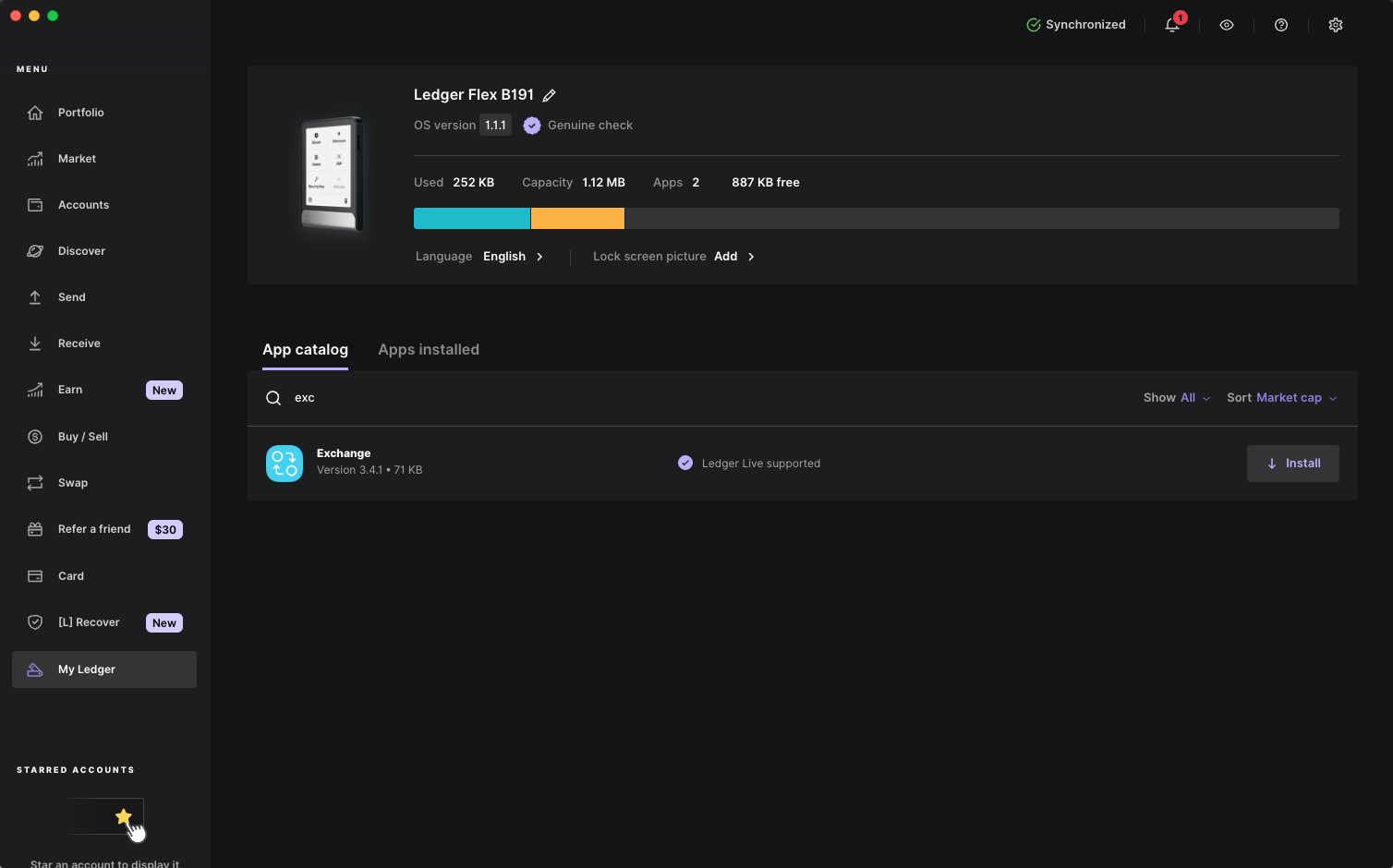
Once the app is installed, navigate to the “Swap” tab in Ledger Wallet.
Here, you’ll find THORChain integrated as a swap provider, thanks to partnerships with services like SwapKit, which simplifies the process of cross-chain asset exchanges. If you wish to swap assets, select THORChain from the list of providers. The supported swap providers for your particular assets automatically show up on this screen.
You’ll be prompted to choose the source and destination chains for your assets. For instance, you might want to swap Bitcoin on the Bitcoin blockchain for Ethereum on the Ethereum network.
With THORChain in Ledger Wallet, every transaction is signed directly on your Ledger signer, preventing any intermediary from accessing or holding your cryptocurrencies. The swap occurs peer-to-peer through THORChain’s decentralized liquidity pools, maintaining your autonomy and reducing the risk associated with centralized exchanges.
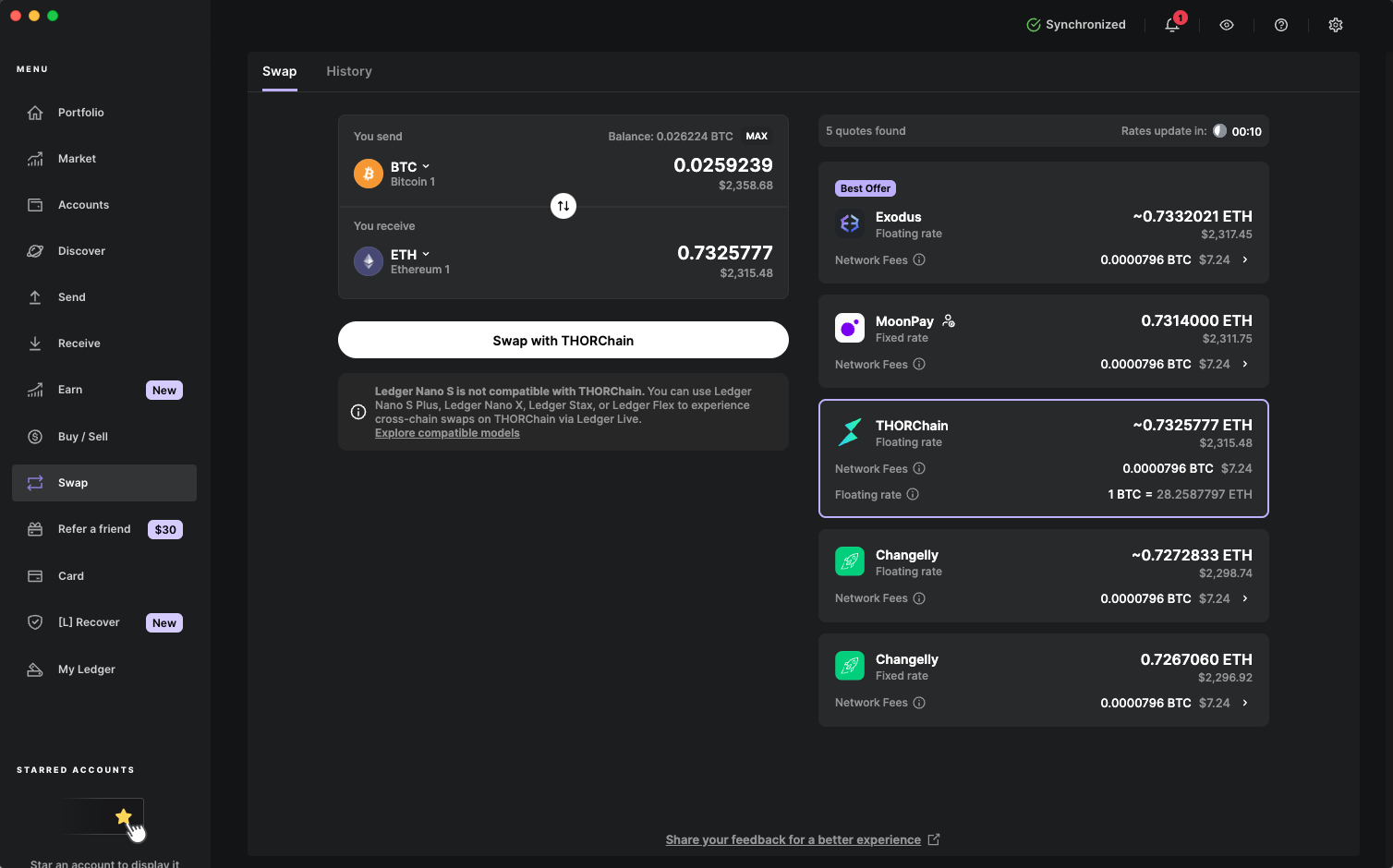
After selecting your assets and chains, review the transaction details presented by Ledger Wallet, including the exchange rate, expected fees, and the amount you’ll receive after the swap. Confirm these details for accuracy. Your Ledger signer will then display the transaction for final verification; confirm on the device by pressing both buttons simultaneously.
Post-confirmation, the transaction will be processed through THORChain’s network. The time for transaction completion can vary based on network congestion. Once completed, the swapped assets will reflect in your Ledger Wallet account associated with the destination blockchain.
Why trust anything else in an increasingly complex digital landscape? Stay ahead of the crypto curve with Ledger’s latest touchscreen signers.
Important Considerations:
Gas Fees: Remember that each blockchain charges transaction fees in its native currency (e.g., ETH for Ethereum, POL for Polygon).
Bridging Risks: Always double-check the legitimacy of the bridging service you’re using to avoid scams or incorrect transactions.
What Pairs Can You Swap Cross-Chain with Ledger
As of November 2024, Ledger Wallet supports swapping with several cryptocurrencies, including:
- Bitcoin (BTC)
- Ethereum (ETH)
- Tether (USDT)
- USD Coin (USDC)
- Ripple (XRP)
- Solana (SOL)
- Other ERC20 Tokens
Note:
- The Ledger Wallet swap feature is unavailable in certain countries.
- It can take some time to receive your crypto. This is usually due to network congestion.
Ledger Makes Swapping and Bridging Easy!
Whether swapping or bridging via Ledger Wallet, you’re strategically positioning your portfolio across diverse blockchain ecosystems with confidence and security. This experience is further fortified across the Ledger lineup owing to its battle-tested security model.
Ledger makes it so you can explore, adapt, and grow—your crypto, your way, all with the peace of mind only Ledger can provide. So why stop to think about the next blockchain, grab a Ledger signer, and get swapping with ease!
The Shift: From Hardware Wallet to signer
Crypto may have begun as a bold experiment, but adoption has grown as the technology and user experience have rapidly evolved; the language used to describe it, has however, stayed stuck in its infancy.
We called our devices “hardware wallets,” mislabelling the role of secure hardware, and obfuscating the role of software (Ledger Live). Along the way, users were left behind.
People believed:
- That value was stored on the device (it isn’t).
- That if you lose the device, you lose your assets (you don’t).
- That the device itself was the endgame (it’s not).
- That those 24 words were a burden only tech-savvy users could manage (not true anymore).
These are more than misconceptions. They are adoption blockers. So at Ledger, we believe that clarity is essential for the next stage of adoption
We’re changing how we speak about our products. And by doing so, we’re changing how people understand digital ownership itself.
Hardware wallets → signers
Ledger devices don’t store value. They sign transactions. They prove intent. They verify identity. They’re not vaults, they’re the secure bridge between who you are and what you do online. They don’t just hold keys. They empower you to trust yourself.
We call them signers now, because that’s what they truly are.
In a world where AI grows more powerful every day, proof of humanity matters more than ever. A signer is more than a security device, it’s your cryptographic proof of you. It gives you a secure foundation to own, authorize, and protect your digital life without relying on anyone else. From sending a transaction to signing a contract or verifying your credentials, your signer ensures you, and only, can provide digital consent – proof of you.Together, signer and Ledger Wallet redefine what digital ownership looks like, clear, secure, and free from compromise.
